文档地址:Traefik Proxy Documentation - Traefik
Kubernetes and Traefik Quick Start - Traefik
1
2
3
4
5
6
7
8
9
10
11
12
13
14
15
16
17
18
19
20
21
22
23
24
25
26
27
| ┌─────────────────────────────────────────────┐
请求进来 ─────▶ │ EntryPoint(入口点) │
│ web:8000 websecure:8443 traefik:8080 │
└──────────────────┬──────────────────────────┘
▼
┌─────────────────────────────────────────────┐
│ ① Router(路由器)—— 决定"归谁管" │
│ rule: Host(`whoami.x`) && PathPrefix(`/`) │
└──────────────────┬──────────────────────────┘
▼
┌─────────────────────────────────────────────┐
│ ② Middleware(中间件链)—— 决定"怎么处理" │
│ basicAuth → rateLimit → retry → stripPrefix│
│ (显式声明顺序,可复用、可 chain 组合) │
└──────────────────┬──────────────────────────┘
▼
┌─────────────────────────────────────────────┐
│ ③ Service(服务)—— 决定"转给谁" │
│ 负载均衡策略 / 健康检查 / 权重 │
└──────────────────┬──────────────────────────┘
▼
后端 Pod
配置从哪来?──▶ Provider(提供者):file / docker / k8sCRD /
k8sIngress / k8sGateway / ...
热加载──▶ 动态修改 ①②③,不重启、不 reload
Router 管匹配,Middleware 管处理,Service 管转发
|
特点
- Provider多源服务发现,不是deployment/service层面的发现, 是CRD层面的发现,由provider决定
- HTTPS自动化
- 零配置文件,配置保存在label、CRD等中
基础概念与首次部署
官方推荐使用helm进行部署
前面的这几个组件之中
1
2
3
4
5
6
7
8
9
10
11
12
13
14
15
16
17
18
19
20
21
22
23
24
25
26
27
28
29
30
31
32
33
34
35
36
37
38
39
40
41
42
43
44
45
46
47
48
49
50
51
52
53
54
55
56
57
58
59
60
61
62
63
64
65
66
67
68
69
70
71
72
73
74
75
76
77
78
79
80
81
82
83
84
85
86
87
88
89
90
91
92
93
94
95
96
97
98
99
100
101
102
103
104
105
106
107
108
109
110
111
112
113
114
115
116
117
118
119
120
121
122
123
124
125
126
127
128
129
130
131
132
133
134
135
136
137
138
139
140
141
142
143
144
145
146
147
148
149
150
151
152
153
154
155
156
157
158
159
160
161
162
163
164
165
166
167
168
169
170
171
172
173
174
175
176
177
178
179
180
181
182
183
184
185
186
187
188
189
190
191
192
193
194
195
196
197
198
199
200
201
202
203
204
205
206
207
208
| helm repo add traefik https://traefik.github.io/charts
helm repo update
helm search repo traefik
NAME CHART VERSION APP VERSION DESCRIPTION
traefik/traefik 41.6.0 v3.7.13 A Traefik based Kubernetes ingress controller
traefik/traefik-crds 1.18.0 A Traefik based Kubernetes ingress controller
traefik/traefik-hub 4.2.0 v2.11.0 Traefik Hub Ingress Controller
traefik/traefik-mesh 4.1.1 v1.4.8 Traefik Mesh - Simpler Service Mesh
traefik/traefikee 4.2.10 v2.12.10 Traefik Enterprise is a unified cloud-native ne...
traefik/hub-manager 1.0.0 v0.45.1 A Helm chart for hub-manager
traefik/maesh 2.1.2 v1.3.2 Maesh - Simpler Service Mesh
kubectl apply -f https://github.com/kubernetes-sigs/gateway-api/releases/download/v1.6.1/standard-install.yaml
kubectl apply -f https://github.com/kubernetes-sigs/gateway-api/releases/download/v1.6.1/experimental-install.yaml
openssl req -x509 -nodes -days 365 -newkey rsa:2048 \
-keyout tls.key -out tls.crt -subj "/CN=*.docker.localhost"
kubectl create secret tls local-selfsigned-tls \
--cert=tls.crt --key=tls.key --namespace traefik
Gateway 的 HTTPS listener 通过 certificateRefs 引用这个 Secret。没有它,helm chart 校验会失败,HTTP→HTTPS 重定向链会断。
ports:
web:
port: 8000
exposedPort: 80
nodePort: 30000
http:
redirections:
entryPoint:
to: websecure
scheme: https
permanent: true
websecure:
port: 8443
exposedPort: 443
nodePort: 30001
api:
dashboard: true
insecure: false
ingressRoute:
dashboard:
enabled: true
matchRule: Host(`dashboard.docker.localhost`)
entryPoints:
- websecure
middlewares:
- name: dashboard-auth
extraObjects:
- apiVersion: v1
kind: Secret
metadata:
name: dashboard-auth-secret
type: kubernetes.io/basic-auth
stringData:
username: admin
password: "P@ssw0rd"
- apiVersion: traefik.io/v1alpha1
kind: Middleware
metadata:
name: dashboard-auth
spec:
basicAuth:
secret: dashboard-auth-secret
ingressClass:
enabled: true
isDefaultClass: true
providers:
kubernetesCRD:
enabled: true
allowCrossNamespace: false
allowExternalNameServices: false
allowEmptyServices: true
kubernetesIngress:
enabled: true
allowEmptyServices: true
kubernetesGateway:
enabled: true
experimentalChannel: true
namespaces: []
gateway:
enabled: true
listeners:
web:
port: 8000
protocol: HTTP
namespacePolicy:
from: All
websecure:
port: 8443
protocol: HTTPS
namespacePolicy:
from: All
mode: Terminate
certificateRefs:
- kind: Secret
name: local-selfsigned-tls
group: ""
service:
spec:
type: NodePort
helm upgrade --install traefik ./ -f my-values.yaml -n traefik --create-namespace
NAME READY STATUS RESTARTS AGE
pod/traefik-6cf8d6b848-67j6p 1/1 Running 0 2m40s
NAME TYPE CLUSTER-IP EXTERNAL-IP PORT(S) AGE
service/traefik NodePort 10.96.175.101 <none> 80:30000/TCP,443:30001/TCP 17h
NAME READY UP-TO-DATE AVAILABLE AGE
deployment.apps/traefik 1/1 1 1 17h
kubectl describe GatewayClass traefik
Name: traefik
Namespace:
Labels: app.kubernetes.io/instance=traefik-traefik
app.kubernetes.io/managed-by=Helm
app.kubernetes.io/name=traefik
helm.sh/chart=traefik-41.6.0
Annotations: meta.helm.sh/release-name: traefik
meta.helm.sh/release-namespace: traefik
API Version: gateway.networking.k8s.io/v1
Kind: GatewayClass
Metadata:
Creation Timestamp: 2026-09-23T09:28:23Z
Generation: 1
Resource Version: 28787211
UID: 81899e87-57b1-44ed-adac-f41297829a1b
Spec:
Controller Name: traefik.io/gateway-controller
Status:
Conditions:
Last Transition Time: 2026-09-23T10:36:56Z
Message: Handled by Traefik controller
Observed Generation: 1
Reason: Handled
Status: True
Type: Accepted
Supported Features:
Name: BackendTLSPolicy
Name: GRPCRoute
Name: GRPCRouteNamedRouteRule
Name: Gateway
Name: GatewayPort8080
Name: HTTPRoute
Name: HTTPRoute303RedirectStatusCode
Name: HTTPRoute307RedirectStatusCode
Name: HTTPRoute308RedirectStatusCode
Name: HTTPRouteBackendProtocolH2C
Name: HTTPRouteBackendProtocolWebSocket
Name: HTTPRouteBackendRequestHeaderModification
Name: HTTPRouteDestinationPortMatching
Name: HTTPRouteHostRewrite
Name: HTTPRouteMethodMatching
Name: HTTPRouteNamedRouteRule
Name: HTTPRouteParentRefPort
Name: HTTPRoutePathRedirect
Name: HTTPRoutePathRewrite
Name: HTTPRoutePortRedirect
Name: HTTPRouteQueryParamMatching
Name: HTTPRouteResponseHeaderModification
Name: HTTPRouteSchemeRedirect
Name: ReferenceGrant
Name: TLSRoute
Name: TLSRouteModeMixed
Name: TLSRouteModeTerminate
Events: <none>
kubectl port-forward -n traefik svc/traefik --address 0.0.0.0 8443:443 &
|
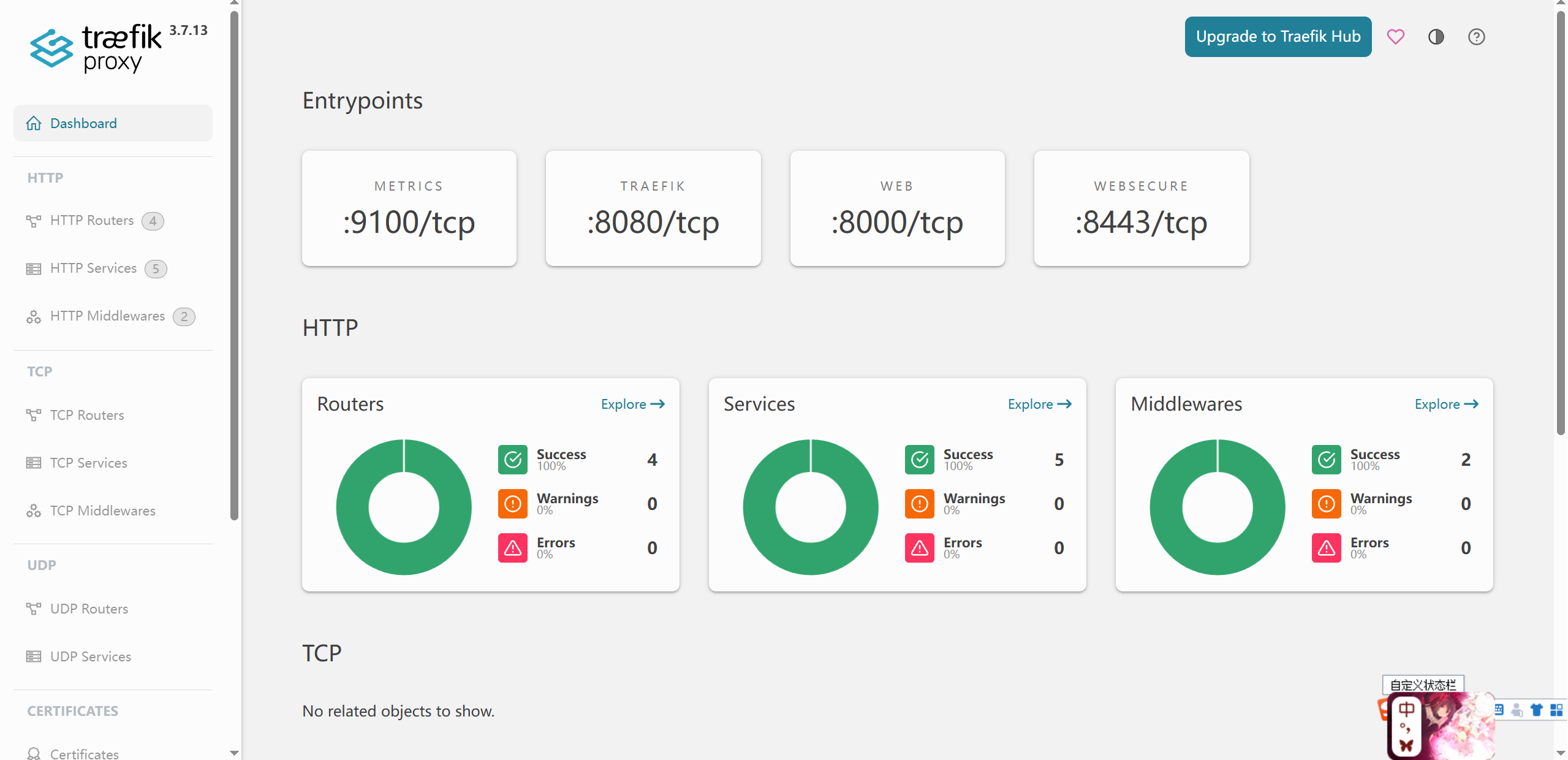
| 对象 |
命名格式 |
你的实例 |
谁生成 |
| Router |
<逻辑名>@<provider> |
traefik-traefik-dashboard-<hash>@kubernetescrd<br>web-to-443@internal |
provider |
| Service(K8s 后端) |
<namespace>-<服务名>-<端口>@<provider> |
whoami-traefik-80@kubernetescrd ← 部署 whoami 后才出现 |
provider |
| Service(内置) |
<功能>@internal |
api / noop / ping / prometheus / dashboard |
Traefik 自己 |
| Middleware |
<逻辑名>@<provider> |
traefik-dashboard-auth@kubernetescrd<br>redirect-web-to-443@internal |
provider |
创建测试业务
1
2
3
4
5
6
7
8
9
10
11
12
13
14
15
16
17
18
19
20
21
22
23
24
25
26
27
28
29
30
31
32
33
34
35
36
37
38
39
40
41
42
43
44
45
46
47
| cat > /tmp/whoami.yaml <<'EOF'
apiVersion: apps/v1
kind: Deployment
metadata:
name: whoami
namespace: traefik
spec:
replicas: 2
selector:
matchLabels: { app: whoami }
template:
metadata:
labels: { app: whoami }
spec:
containers:
- name: whoami
image: traefik/whoami
ports: [{ containerPort: 80 }]
---
apiVersion: v1
kind: Service
metadata:
name: whoami
namespace: traefik
spec:
selector: { app: whoami }
ports: [{ port: 80 }]
EOF
kubectl apply -f /tmp/whoami.yaml
cat > /tmp/whoami-route.yaml <<'EOF'
apiVersion: traefik.io/v1alpha1
kind: IngressRoute
metadata:
name: whoami
namespace: traefik
spec:
entryPoints:
- websecur
routes:
- match: PathPrefix(`/whoami`)
kind: Rule
services:
- name: whoami
port: 80
EOF
kubectl apply -f /tmp/whoami-route.yaml
|
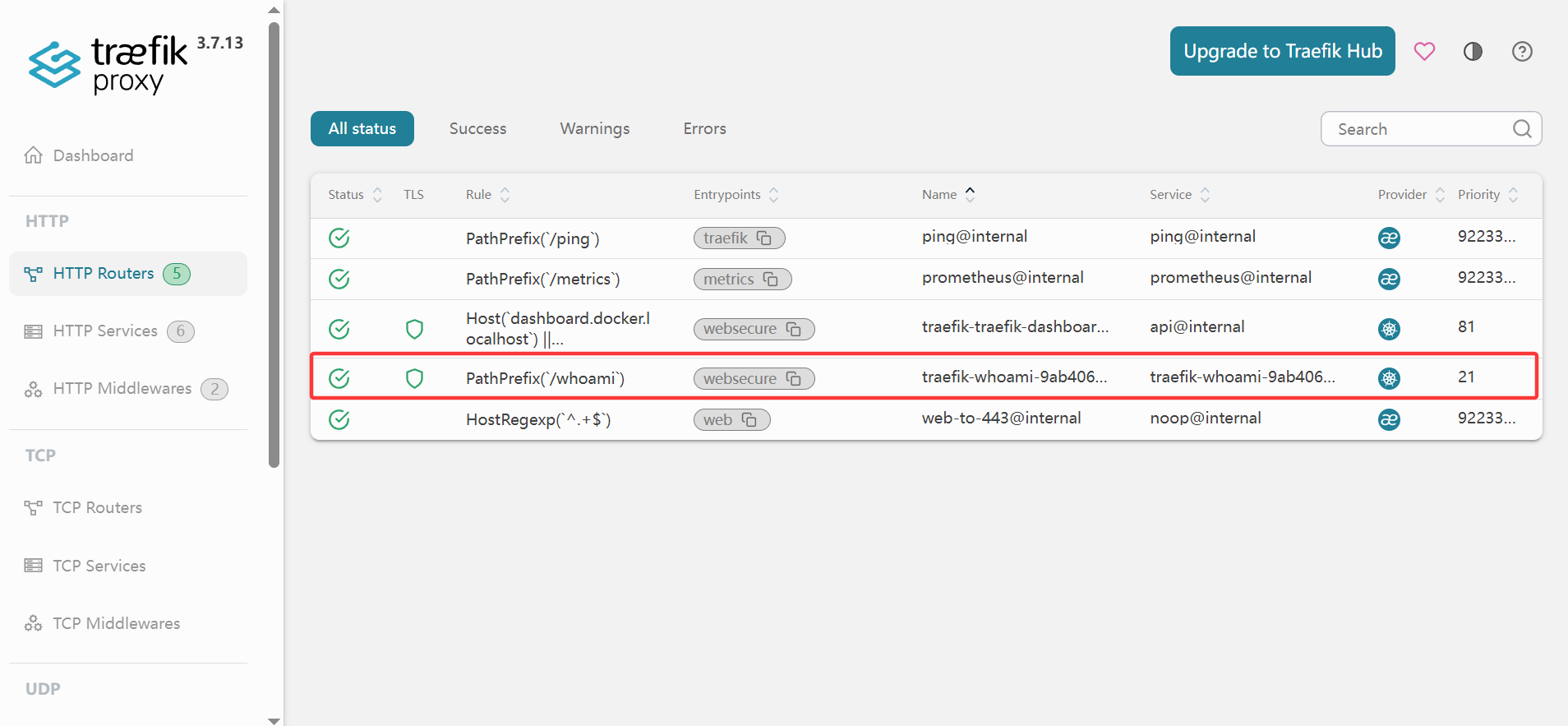
middleware组件
middleware就是可以自定义使用哪些插件,并且定义插件使用的顺序:
比如顺序 A:认证在前,限流在后
不带密码访问 → 401
带对密码、但超了限速 → 429
顺序B:限流在前,认证在后
不带密码访问 → 429或401
带对密码、但超了限速 → 429
1
2
3
4
5
6
7
8
9
10
11
12
13
14
15
16
17
18
19
20
21
22
23
24
25
26
27
28
29
30
31
32
33
34
35
36
37
38
39
40
41
42
43
44
45
46
47
48
49
50
51
52
53
54
55
56
57
58
59
|
apiVersion: traefik.io/v1alpha1
kind: Middleware
metadata:
name: rate-limiter
namespace: traefik
spec:
rateLimit:
average: 100
burst: 50
---
apiVersion: traefik.io/v1alpha1
kind: IngressRoute
metadata:
name: whoami
namespace: traefik
spec:
entryPoints:
- websecure
routes:
- match: PathPrefix(`/whoami`)
kind: Rule
priority: 200
middlewares:
- name: rate-limiter
services:
- name: whoami
port: 80
kubectl apply -f middleware.yaml
curl -k https://172.19.0.4:30001/whoami
Hostname: whoami-86dcdbd44b-tzdwm
IP: 127.0.0.1
IP: ::1
IP: 10.244.2.22
IP: fe80::9444:c9ff:fee1:5fa6
RemoteAddr: 10.244.1.17:44788
GET /whoami HTTP/1.1
Host: 192.168.10.100
User-Agent: curl/7.76.1
Accept: */*
Accept-Encoding: gzip
X-Forwarded-For: 172.19.0.4
X-Forwarded-Host: 192.168.10.100
X-Forwarded-Port: 443
X-Forwarded-Proto: https
X-Forwarded-Server: traefik-6cf8d6b848-67j6p
X-Real-Ip: 172.19.0.4
...
ingressRoute:
dashboard:
enabled: true
matchRule: Host(`dashboard.docker.localhost`) || Host(`192.168.10.100`) || Host(`127.0.0.1`)
...
|
Provider 机制
- Provider 是什么:配置的来源。
file / docker / kubernetesCRD / kubernetesIngress / kubernetesGateway / consul / etcd 等十几种——你已经用过的 k8sCRD 只是其中一种
- 热加载 vs reload:改配置 → 秒级生效,没有 reload 这个动作
- 多 Provider 并存:同一个 Traefik 实例可以同时吃 Docker label + K8s CRD + file 文件,三份配置聚合到一起(Dashboard 里那些
@kubernetescrd、@internal 后缀就是来源标记)
- static vs dynamic 的硬边界:启动时定死的(端口、provider 开关)vs 运行期随时改的(路由、中间件)
| 分组 |
Provider |
监听什么 |
| K8s |
kubernetesCRD |
IngressRoute/Middleware CRD |
| K8s |
kubernetesIngress |
原生 Ingress 资源 |
| K8s |
kubernetesGateway |
Gateway API HTTPRoute |
| K8s |
kubernetesIngressNGINX |
原生 Ingress + nginx.ingress.kubernetes.io 注解翻译 |
| K8s |
knative |
Knative 资源 |
| 文件 |
file |
一个 YAML 文件/目录 |
| 容器平台 |
docker / swarm / ecs / nomad / rancher |
容器 label |
| KV 存储 |
consul / consulCatalog / etcd / redis |
KV 里的配置 |
| values.yaml静态文件关键配置 |
|
|
1
2
3
4
5
6
7
8
9
10
11
12
13
14
15
16
17
18
19
20
21
22
23
24
25
26
27
28
29
30
31
32
33
34
35
36
37
38
39
40
41
42
43
44
45
46
47
48
49
50
|
ports:
web:
port: 8000
http:
redirections: ...
websecure:
port: 8443
metrics:
port: 9100
traefik:
port: 8080
api:
dashboard: true
insecure: false
providers:
kubernetesCRD:
enabled: true
allowEmptyServices: true
kubernetesIngress:
enabled: true
kubernetesGateway:
enabled: true
experimentalChannel: true
providers:
file:
enabled: true
watch: true
content:
http:
routers:
manual-route:
rule: PathPrefix(`/manual`)
entryPoints: [websecure]
service: whoami-direct
services:
whoami-direct:
loadBalancer:
servers:
- url: http://whoami.traefik.svc.cluster.local:80
|
通过三种provider方式创建traefik路由
- Ingress 尾缀@kubernetes,够用但不够表达
- IngressRoute 尾缀@kubernetescrd,能力全开但锁死 Traefik
- HTTPRoute 尾缀@kubernetesgateway,表达力 + 标准化可移植。
日常主力 IngressRoute,HTTPRoute 必须会,原生 Ingress 只管存量兼容。
| 能力 |
原生 Ingress |
IngressRoute |
HTTPRoute |
| 路径/Host 匹配 |
✅ |
✅ |
✅ |
| Header/Method/Query 匹配 |
❌ |
✅ |
✅ |
| 挂中间件(限流/认证) |
❌(靠注解) |
✅ |
⚠️ 部分(靠 BackendTLSPolicy 等政策对象) |
| 权重分流(金丝雀) |
❌ |
✅ TraefikService |
✅ 天然支持 weight: |
| 跨 namespace |
❌ |
⚠️ 要开 allowCrossNamespace |
✅ ReferenceGrant |
| 厂商可移植性 |
高(但能力弱) |
❌ 只有 Traefik |
✅ 标准化,换网关不用改 |
| 原生Ingress暴露 whoami |
|
|
|
1
2
3
4
5
6
7
8
9
10
11
12
13
14
15
16
17
18
|
apiVersion: networking.k8s.io/v1
kind: Ingress
metadata:
name: whoami-ingress
namespace: traefik
spec:
ingressClassName: traefik
rules:
- http:
paths:
- path: /whoami-ingress
pathType: Prefix
backend:
service:
name: whoami
port:
number: 80
|
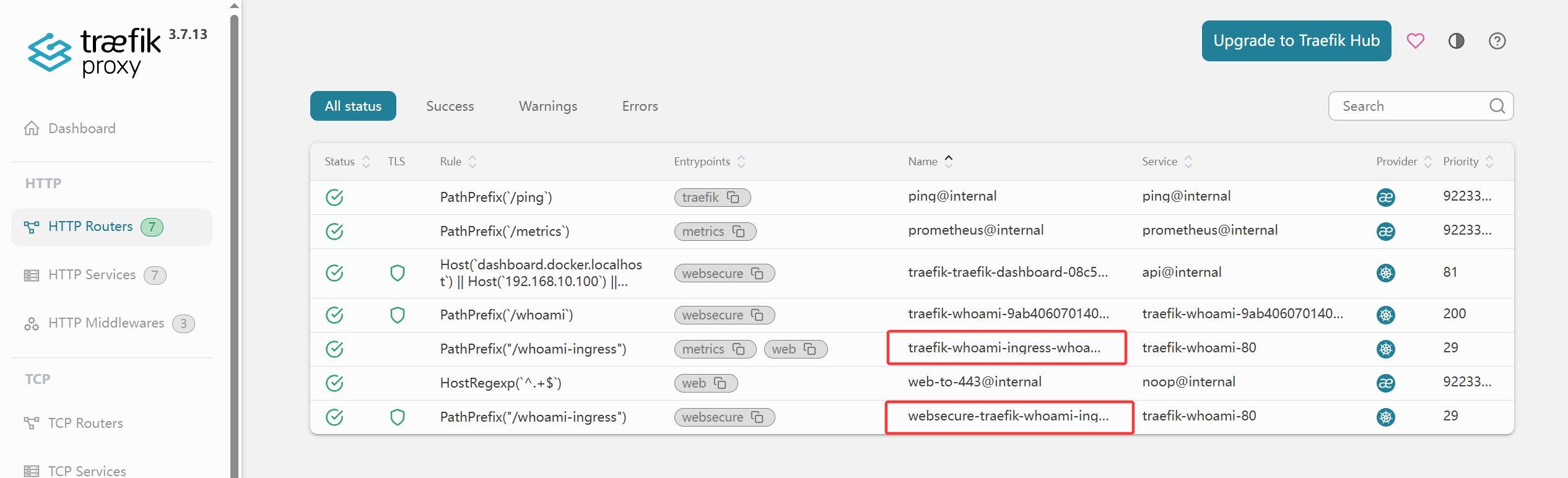
Gateway API 的 HTTPRoute
1
2
3
4
5
6
7
8
9
10
11
12
13
14
15
16
17
|
apiVersion: gateway.networking.k8s.io/v1
kind: HTTPRoute
metadata:
name: whoami-gw
namespace: traefik
spec:
parentRefs:
- name: traefik-gateway
rules:
- matches:
- path:
type: PathPrefix
value: /whoami-gw
backendRefs:
- name: whoami
port: 80
|
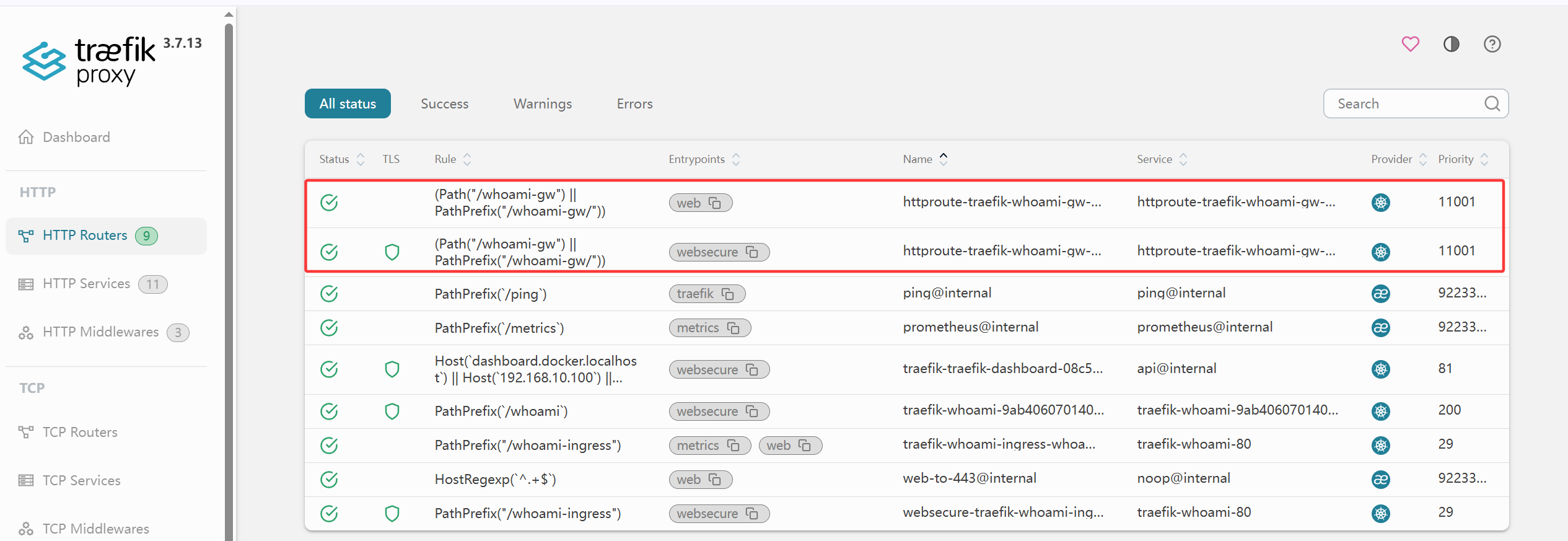
金丝雀发布
1
2
3
4
5
6
7
8
9
10
11
12
13
14
15
16
17
18
19
20
21
22
23
24
25
26
27
28
29
30
31
32
33
34
35
36
37
38
39
40
41
42
43
44
45
46
47
48
49
50
51
52
53
54
55
56
57
58
59
60
61
62
63
64
65
66
67
68
69
70
71
72
| 1.创建测试用v2服务
apiVersion: apps/v1
kind: Deployment
metadata:
name: whoami-v2
namespace: traefik
spec:
replicas: 2
selector:
matchLabels: { app: whoami-v2 }
template:
metadata:
labels: { app: whoami-v2 }
spec:
containers:
- name: whoami
image: traefik/whoami
ports: [{ containerPort: 80 }]
---
apiVersion: v1
kind: Service
metadata:
name: whoami-v2
namespace: traefik
spec:
selector: { app: whoami-v2 }
ports: [{ port: 80 }]
kubectl apply -f whoami-v2.yaml
2.创建traefikservice进行分流
apiVersion: traefik.io/v1alpha1
kind: TraefikService
metadata:
name: whoami-canary
namespace: traefik
spec:
weighted:
services:
- name: whoami
port: 80
weight: 90
- name: whoami-v2
port: 80
weight: 10
kubectl apply -f whoami-canary.yaml
3.ingressroute指向新的service
apiVersion: traefik.io/v1alpha1
kind: IngressRoute
metadata:
name: canary
namespace: traefik
spec:
entryPoints: [websecure]
routes:
- match: PathPrefix(`/canary`)
kind: Rule
services:
- name: whoami-canary
kind: TraefikService
kubectl apply -f ir-service.yaml
for i in $(seq 1 100); do curl -sk https://172.19.0.4:30001/canary | grep ^Hostname; done \
| awk '{print $2}' | awk -F- '{print ($2=="v2")?"v2":"v1"}' | sort | uniq -c
90 v1
10 v2
|
流量镜像
1
2
3
4
5
6
7
8
9
10
11
12
13
14
15
16
17
18
19
20
21
22
23
24
25
26
27
28
29
30
31
32
33
34
35
36
37
38
39
40
41
42
43
44
45
46
47
48
49
50
51
52
53
54
55
56
57
58
59
60
| 用户请求
│
▼
Traefik(Router /mirror → TraefikService whoami-mirror)
│
├─── ① 原始请求 ──▶ Service whoami (v1 Pod)
│ │
│ ▼
│ v1 的响应 ──────▶ 返回给用户 ✅【只有这条回程】
│
└─── ② 同一个请求复制一份 ──▶ Service whoami-v2 (v2 Pod)
│
▼
v2 的响应 ──▶ Traefik 收到后直接丢弃 ❌
1.创建mirror.yaml
apiVersion: traefik.io/v1alpha1
kind: TraefikService
metadata:
name: whoami-mirror
namespace: traefik
spec:
mirroring:
name: whoami
port: 80
mirrors:
- name: whoami-v2
port: 80
percent: 100
---
apiVersion: traefik.io/v1alpha1
kind: IngressRoute
metadata:
name: mirror-demo
namespace: traefik
spec:
entryPoints: [websecure]
routes:
- match: PathPrefix(`/mirror`)
kind: Rule
services:
- name: whoami-mirror
kind: TraefikService
kubectl apply -f mirror.yaml
curl -s http://127.0.0.1:9100/metrics | grep 'traefik_service_requests_total' | grep whoami
traefik_service_requests_total{code="200",method="GET",protocol="http",service="traefik-whoami-80@kubernetescrd"} 510
traefik_service_requests_total{code="200",method="GET",protocol="http",service="traefik-whoami-v2-80@kubernetescrd"} 190
for i in $(seq 1 100); do curl -sk https://172.19.0.4:30001/mirror | grep ^Hostname; done | sort | uniq -c
50 Hostname: whoami-86dcdbd44b-jnf9v
50 Hostname: whoami-86dcdbd44b-tzdwm
curl -s http://127.0.0.1:9100/metrics | grep 'traefik_service_requests_total' | grep whoami
traefik_service_requests_total{code="200",method="GET",protocol="http",service="traefik-whoami-80@kubernetescrd"} 610
traefik_service_requests_total{code="200",method="GET",protocol="http",service="traefik-whoami-v2-80@kubernetescrd"} 290
通过100次访问之后,v1和v2两个服务计数都已经增加了100
|