搜索中...
🔍

未找到相关结果

Akemi

两周复习EFK-第七天之Helm部署Fluentd+Fluent Bit

2026/04/01
特性 Logstash (ELK) Fluent Bit (EFK)
开发语言 JRuby (依赖 JVM,内存大户) C (极度轻量,几 MB 内存)
配置风格 三段式 (Input/Filter/Output) 插件化配置,更模块化
生态地位 传统的企业级日志中心 云原生、K8s、嵌入式设备的首选
处理能力 插件极其丰富,处理逻辑极强 偏重转发,逻辑相对简单

Fluent Bit + Fluentd的配合

1
2
3
4
5
6
7
8
9
10
11
12
13
14
1.Fluent Bit
在 K8s 每一个节点(Node)上以 DaemonSet 方式运行
把容器产生的各种标准输出、系统日志快速抓取出来
不进行复杂的清洗,直接把原始数据转发出去

2.Fluentd
作为集群中独立的Deployment运行
接收来自几十个节点上 Fluent Bit 发来的数据。在这里进行深度加工:利用丰富的插件进行 Grok 解析、字段重命名、甚至去调个外部 API 补全信息。处理完后,再写入 Elasticsearch。

Fluentd/Fluent Bit 最大的特色是 **Tag(标签)路由**
- 给 SSH 日志打上 `auth.ssh` 标签。
- 给 Nginx 日志打上 `web.nginx` 标签。
-`[OUTPUT]` 块中通过 `Match auth.*` 或是 `Match web.*` 实现精准转发。这比 Logstash 的 `if [type] == "xxx"` 逻辑更高效

Helm部署Fluentd

参考文档:https://artifacthub.io/packages/helm/fluent/fluentd

https://github.com/fluent/helm-charts

因为我们是helm糕手,所以不直接部署,我们直接拉下来看values变量文件

1
2
3
4
5
6
7
8
9
10
11
12
13
14
15
16
17
# 添加仓库
helm repo add fluent https://fluent.github.io/helm-charts/
unset http_proxy
unset https_proxy
helm repo update

# 看下用哪个版本
helm search repo fluent/fluentd --versions
NAME CHART VERSION APP VERSION DESCRIPTION
fluent/fluentd 0.5.3 v1.17.1 A Helm chart for Kubernetes
fluent/fluentd 0.5.2 v1.16.2 A Helm chart for Kubernetes
fluent/fluentd 0.5.1 v1.16.2 A Helm chart for Kubernetes
fluent/fluentd 0.5.0 v1.16.2 A Helm chart for Kubernetes

# 最新的0.5.3版本已经是2025年出的了,所以用这个
helm pull fluent/fluentd --version 0.5.3 --untar
cd fluentd/

变量文件参数说明

1
2
3
4
5
6
7
8
9
10
11
12
13
14
15
16
17
18
19
20
21
22
23
24
25
# 变化
variant: elasticsearch8
# 默认DaemonSet 模式,可选聚合模式(Deployment/StatefulSet),接收Fluent Bit的日志
kind: "DaemonSet"

metrics: # prometheus的相关配置,默认关闭
serviceMonitor:...
prometheusRule:...

# fluent引入外置插件的字段
plugins: []
# - fluent-plugin-out-http

# 引用集群中已经存在的、非Helm维护的ConfigMap
configMapConfigs: []
# - fluentd-prometheus-conf
# - fluentd-systemd-conf

# Fluentd配置文件内部定义
fileConfigs:
01_sources.conf: |-
## logs from podman
<source>
@type tail
...

调整配置与部署Fluentd

1
2
3
4
5
6
7
8
9
10
11
12
13
14
15
16
17
18
19
20
21
22
23
24
25
26
27
28
29
30
31
32
33
34
35
36
37
38
39
40
41
42
43
44
45
46
47
48
49
50
51
52
53
54
55
56
57
58
59
修改
variant: elasticsearch8
kind: "Deployment"
...
# 新增转发的service,默认只有一个metrics的
service:
enabled: true
type: "ClusterIP"
annotations: {}
ports:
- name: "forwarder"
protocol: TCP
containerPort: 24224

fileConfigs:
00_monitoring.conf: |-
# 监控插件的主入口
<source>
@type prometheus
bind 0.0.0.0
port 24231
metrics_path /metrics
</source>

# 监控 Fluentd 自身的 input/output 指标
<source>
@type prometheus_monitor
interval 10s
</source>

# 监控输出端(ES)的写入情况
<source>
@type prometheus_output_monitor
interval 10s
</source>
01_input.conf: |-
<source>
@type forward
port 24224
bind 0.0.0.0
</source>

02_output.conf: |-
<match **>
@type elasticsearch
host "192.168.10.100"
port 9200
scheme https
ssl_verify false
user elastic
password "123456"
logstash_format true
logstash_prefix "kind-logs"
</match>

# 部署helm
kubectl create ns fluent
helm upgrade --install fluentd . -f ./values.yaml -n fluent

Helm部署Fluent Bit

1
2
3
4
5
6
7
8
9
helm search repo fluent/fluent-bit --versions
NAME CHART VERSION APP VERSION DESCRIPTION
fluent/fluent-bit 0.57.0 5.0.0 Fast and lightweight log processor and forwarde...
fluent/fluent-bit 0.56.0 4.2.3 Fast and lightweight log processor and forwarde...
fluent/fluent-bit 0.55.1 4.2.3 Fast and lightweight log processor and forwarde...
fluent/fluent-bit 0.55.0 4.2.2 Fast and lightweight log processor and forwarde...

helm pull fluent/fluent-bit --version 0.57.0 --untar
cd fluent-bit/

变量文件参数说明

1
2
3
4
5
6
7
8
9
10
11
12
13
14
15
16
17
18
19
20
21
22
23
24
25
26
27
28
29
30
31
32
33
34
35
36
37
38
39
40
41
42
43
# 核心配置
config:
service:
inputs:
filters:
outputs:
customParsers:

[SERVICE]:全局配置
Flush 数据冲刷周期,1秒
Parsers_File 子配置文件位置
HTTP_Server/Health_Check:开启监控

[INPUT]:数据源
Name 插件名称(tail插件、systemd插件)
Path 数据源位置
Tag 给数据打tag
multiline.parser docker, cri 用解析器剥离容器运行时的JSON封装
Systemd_Filter 过滤某个systemd-service

[FILTER]:过滤器
Name kubernetes 启用Kubernetes元数据过滤器
Match kube.* 仅作用于tag以 kube. 开头的日志记录
Merge_Log On 解析为JSON
Keep_Log Off 删除原log
K8S-Logging.Parser On 启用基于Pod注解的解析
K8S-Logging.Exclude On 注解fluentbit.io/exclude: "true" 则该 Pod 的所有日志都会被丢弃

[OUTPUT]:
Name es:使用 Elasticsearch 输出插件。
Match kube.*:仅处理标签以 kube. 开头的日志
Host elasticsearch-master:Elasticsearch 服务的地址
Logstash_Format On:启用 Logstash 风格的索引命名例如 logstash-2026.03.31)
Retry_Limit False:重试次数不设限

Match host.*:处理标签以 host.开头的日志,即systemd的主机日志
Logstash_Prefix node 自定义索引前缀,例如 node-2026.03.31

[PARSER]: 格式转换器
Name docker_no_time 解析器的名称,供其他配置
Format json
Time_Keep Off 关闭日志自带的时间戳
Time_Format %Y-%m-%dT%H:%M:%S.%L 定义时间戳的解析格式

调整配置与部署Fluent bit

正常fluent bit会从容器日志和systemd两种方式获取日志(默认配置)

但我这里是kind部署的k8s,所以只要用tail插件

1
2
3
4
5
6
7
8
9
10
11
12
13
14
15
16
17
18
19
20
21
22
23
24
25
26
27
28
29
30
31
32
33
34
35
36
37
38
39
40
41
42
43
44
45
46
47
48
49
50
51
52
53
54
55
56
57
58
59
60
61
62
extraVolumes:
- name: varlog
hostPath:
path: /var/log
extraVolumeMounts:
- name: varlog
mountPath: /var/log
readOnly: true

# ↑这部分不需要,fluent-bit官方已经加好了

#
config:
service: |
[SERVICE]
Daemon Off
Flush {{ .Values.flush }}
Log_Level {{ .Values.logLevel }}
Parsers_File /fluent-bit/etc/parsers.conf
Parsers_File /fluent-bit/etc/conf/custom_parsers.conf
HTTP_Server On
HTTP_Listen 0.0.0.0
HTTP_Port {{ .Values.metricsPort }}
Health_Check On


inputs: |
[INPUT]
Name tail
Path /var/log/containers/*.log
# Kind 环境建议加上 DB 记录读取位点
DB /fluent-bit/tail_db.db
multiline.parser docker, cri
Tag kube.*
# 日志缓冲区,因为积压的日志有点多
Mem_Buf_Limit 50MB
Skip_Long_Lines On

filters: |
[FILTER]
Name kubernetes
Match kube.*
Merge_Log On
Keep_Log Off
K8S-Logging.Parser On
K8S-Logging.Exclude On

# 修改 outputs:由直连 ES 改为转发 Fluentd
outputs: |
[OUTPUT]
Name forward
Match *
Host fluentd.fluent.svc.cluster.local
Port 24224
# 开启连接重试
Retry_Limit False
# 开启网络保持
net.keepalive On


# helm部署
helm upgrade --install fluent-bit . -f ./values.yaml -n fluent

定义索引模板

现在数据已经发给es了,但是在这个搭建的流程中,没有通过grok来提取字段,在es中也没有专门为这条fluent bit+fluentd的路径定义索引模板

先搞个索引模板,让ES中可以看到它,等后面处理完数据,可以再进行完善

fluent bit+fluentd的数据处理后面再说吧,今天太忙了,好累。

1
2
3
4
5
6
7
8
9
10
11
12
13
14
15
16
17
18
19
20
21
22
23
24
25
26
27
28
29
30
31
32
33
34
35
36
37
38
39
40
41
42
43
44
45
46
47
48
49
50
51
52
53
54
55
56
57
58
59
60
61
62
63
64
65
66
67
68
69
70
71
72
73
74
75
76
77
78
79
80
81
82
83
84
85
86
87
88
89
90
91
# 用curl一眼数据结构,可以看到里面非常乱
curl -u elastic:123456 -k -X GET "https://192.168.10.100:9200/kind-logs-*/_search?pretty" -H 'Content-Type: application/json' -d'
{
"size": 1,
"sort": [{ "@timestamp": "desc" }]
}
'
{
"took" : 16,
"timed_out" : false,
"_shards" : {
"total" : 1,
"successful" : 1,
"skipped" : 0,
"failed" : 0
},
"hits" : {
"total" : {
"value" : 1560,
"relation" : "eq"
},
"max_score" : null,
"hits" : [
{
"_index" : "kind-logs-2026.04.01",
"_id" : "k3B3SJ0BhqMFurw_h4yK",
"_score" : null,
"_source" : {
"time" : "2026-04-01T09:54:40.590735118Z",
"stream" : "stderr",
"_p" : "F",
"log" : "I0401 09:54:40.590512 1 main.go:297] Handling node with IPs: map[172.19.0.2:{}]",
"kubernetes" : {
"pod_name" : "kindnet-nncxf",
"namespace_name" : "kube-system",
"pod_id" : "c725a431-7ed2-446d-b658-117b2db76821",
"labels" : {
"app" : "kindnet",
"controller-revision-hash" : "5b49848c94",
"k8s-app" : "kindnet",
"pod-template-generation" : "1",
"tier" : "node"
},
"host" : "ws-k8s-worker",
"pod_ip" : "172.19.0.4",
"container_name" : "kindnet-cni",
"docker_id" : "ad3a9ffe8101377b135ea0113d6612fd9d251ce2eb089cab587b484db0afbb25",
"container_hash" : "sha256:50415e5d05f05adbdfd902507532ebb86f924dc2e05511a3b47920156ee4236e",
"container_image" : "docker.io/kindest/kindnetd:v20241108-5c6d2daf"
},
"@timestamp" : "2026-04-01T09:54:40.590735118+00:00"
},
"sort" : [
1775037280590
]
}
]
}
}

# 定义索引模板
PUT _index_template/kind_logs_template
{
"index_patterns": ["kind-logs-*"],
"priority": 200,
"template": {
"settings": {
"index.number_of_shards": 1,
"index.number_of_replicas": 0,
"index.refresh_interval": "10s"
},
"mappings": {
"properties": {
"@timestamp": { "type": "date" },
"log": { "type": "text", "analyzer": "standard" },
"stream": { "type": "keyword" },
"time": { "type": "date" },
"kubernetes": {
"properties": {
"pod_name": { "type": "keyword" },
"namespace_name": { "type": "keyword" },
"host": { "type": "keyword" },
"container_name": { "type": "keyword" },
"docker_id": { "type": "keyword" },
"labels": { "type": "object", "enabled": true }
}
}
}
}
}
}

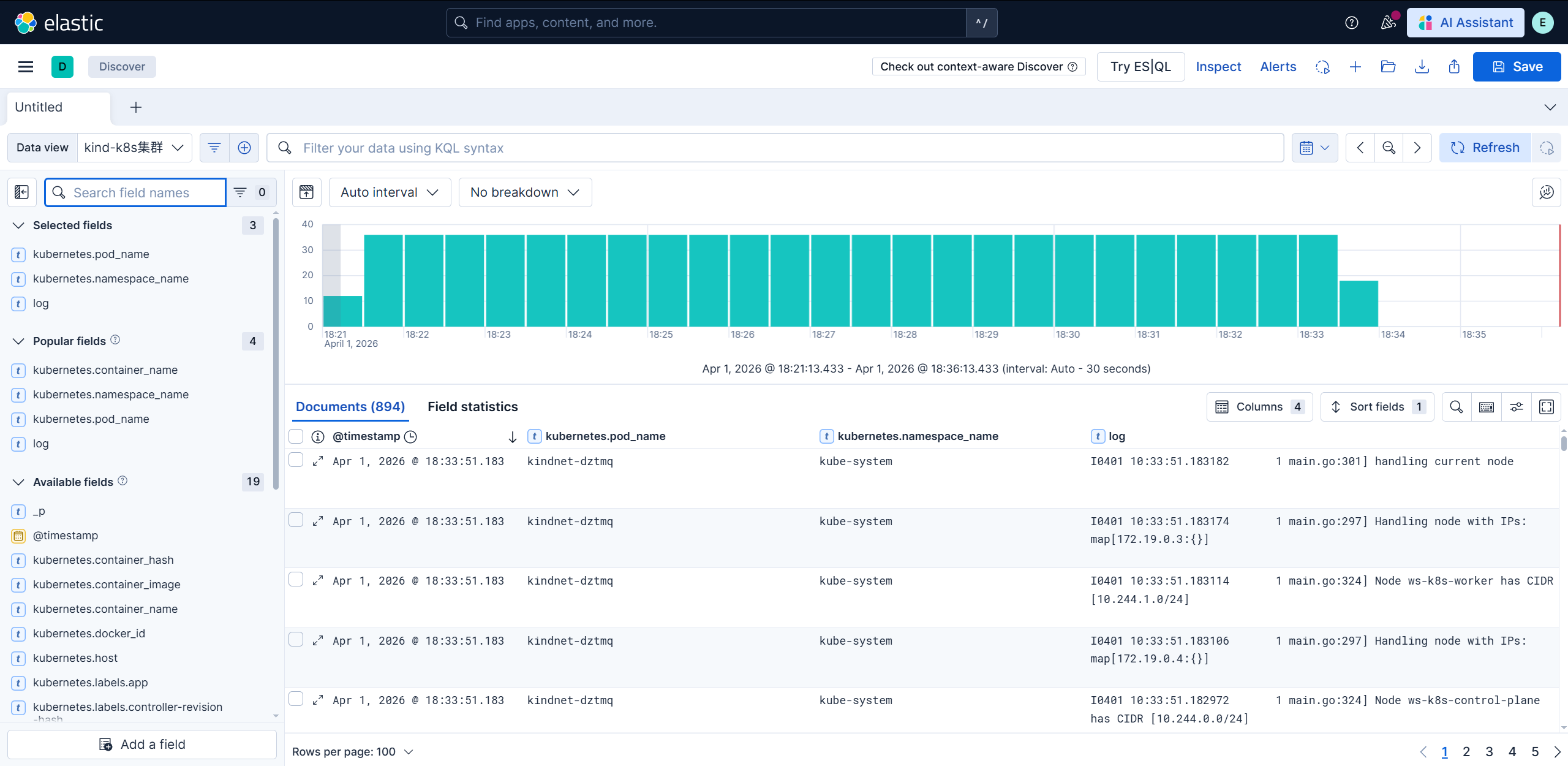
查看今天获取的日志

1
2
3
4
stack-management  data views
创建

打开discovery

CATALOG
  1. 1. Helm部署Fluentd
    1. 1.1. 变量文件参数说明
    2. 1.2. 调整配置与部署Fluentd
  2. 2. Helm部署Fluent Bit
    1. 2.1. 变量文件参数说明
    2. 2.2. 调整配置与部署Fluent bit
  3. 3. 定义索引模板
    1. 3.1. 查看今天获取的日志